
Se afișează postările cu eticheta JAX-RS. Afișați toate postările
Se afișează postările cu eticheta JAX-RS. Afișați toate postările
joi, 7 iulie 2016

miercuri, 6 iulie 2016

marți, 5 iulie 2016

duminică, 8 mai 2016

luni, 12 octombrie 2015
JAX-RS Access HTTP Cookie in Resource
In this post, you can see how to access cookie parameters from a
JAX-RS resource
Let's suppose that we have an
application named, JaxrsCookieParameters_EE7,
and a cookie as: hellofrom
= Leonard. Via javax.ws.rs.CookieParam
we can easily access this cookie in a JAX-RS resource as below:
import javax.ws.rs.CookieParam;
import javax.ws.rs.Produces;
import javax.ws.rs.GET;
import javax.ws.rs.Path;

@Path("hello")
public class HelloResource {

    @GET
    @Produces("text/plain") // default: */*
    public String hello(@CookieParam(value="hellofrom") String from) {
        return "Hello, " + from+"!";
    }
}
import javax.ws.rs.ApplicationPath;
import javax.ws.rs.core.Application;

@ApplicationPath("webresources")
public class ApplicationConfig extends Application {
}
The output will be as in figure
below (for testing I just added the cookie manually in Google Chrome). The test
URL is: http://localhost:8080/JaxrsCookieParameters_EE7/webresources/hello

Note Do not forget that cookies
implies several limitations (use of semi-colons ;, and commas ,)! Is important to read the corresponding RFC.
The complete application is
available here.
vineri, 9 octombrie 2015
JAX-RS extract the URI path parameters from the request URI
In this post, you can see how to extract the URI path parameters
from the request URI in a JAX-RS application
Let's suppose that we have an
application named, JaxrsPathParameters_EE7,
and the following JAX-RS resource:
import javax.ws.rs.Produces;
import javax.ws.rs.GET;
import javax.ws.rs.Path;

@Path("/users/{username: [a-zA-Z][a-zA-Z_0-9]*}")
public class HelloUsersResource {

 @GET
 @Path("/admin/{id: \\d+}")
 @Produces("text/plain")
 public String helloAdmin() {
  return "Hello, Admin!";
 }

 @GET
 @Path("/user")
 @Produces("text/plain")
 public String helloUser() {
  return "Hello, User!";
 }
}
You already know how to work with
this resource from the JAX-RS
working with URI path templates example.
Further,
let's suppose that you need to extract the URI parameters (in this case, username
and id).
This is very easy to accomplish via javax.ws.rs.PathParam annotation
in the method parameter, as below:import javax.ws.rs.Produces;
import javax.ws.rs.GET;
import javax.ws.rs.Path;
import javax.ws.rs.PathParam;
@Path("/users/{username: [a-zA-Z][a-zA-Z_0-9]*}")
public class HelloUsersResource {
@GET
@Path("/admin/{id: \\d+}")
@Produces("text/plain")
public String helloAdmin(@PathParam("username") String admin, @PathParam("id") String id) {
return "Hello, " + admin + " (" + id + ")!";
}
@GET
@Path("/user")
@Produces("text/plain")
public String helloUser(@PathParam("username") String user) {
return "Hello, " + user + "!";
}
}
http://localhost:8080/JaxrsPathParameters_EE7/webresources/users/foo/admin/007
Produces: Hello, foo (007)!
http://localhost:8080/JaxrsPathParameters_EE7/webresources/users/buzz/user
Produces: Hello, buzz!
- If the URI path template variable cannot be cast to the specified type, the JAX-RS runtime returns an HTTP 400 ("Bad Request") error to the client.
- If the @PathParam annotation cannot be cast to the specified type, the JAX-RS runtime returns an HTTP 404 ("Not Found") error to the client.
The complete application is available here.
sâmbătă, 3 octombrie 2015
JAX-RS configure application examples
In this post, you can see how to configure a JAX-RS application
Let's suppose that we have an
application named, JaxrsConfigureApplication_EE7,
and the following two resources:
import javax.ws.rs.Produces;
import javax.ws.rs.GET;
import javax.ws.rs.Path;

@Path("helloworld")
public class HelloWorldResource {

 @GET
 @Produces("text/plain") // default: */*
 public String helloWorld() {
  return "Hello, World!";
 }
}

import javax.ws.rs.Produces;
import javax.ws.rs.GET;
import javax.ws.rs.Path;

@Path("byeworld")
public class ByeWorldResource {

 @GET
 @Produces("text/plain") // default: */*
 public String byeWorld() {
  return "Bye, World!";
 }
}
Basically, by configuring a JAX-RS
application means to set the base URI from which an application's resources
respond to requests. This can be accomplished in two ways:
·
using
the @ApplicationPath annotation in a subclass of javax.ws.rs.core.Application packaged within the WAR
For example, if your base URI will
be /webresources
(or, webresources)
then simply add the following class:
import javax.ws.rs.ApplicationPath;
import javax.ws.rs.core.Application;

@ApplicationPath("webresources")
public class ApplicationConfig extends Application {
}
In the preceding example, the base
URI is set to /webresources,
which means that all resources defined within the application are relative to /webresources.
Check out the below URLs:
// this URL will invoke HelloWorldResource#helloWorld()
http://localhost:8080/JaxrsConfigureApplication_EE7/webresources/helloworld
// this URL will invoke ByeWorldResource#byeWorld()
http://localhost:8080/JaxrsConfigureApplication_EE7/webresources/byeworld
So, by default, all the resources
in an archive will be processed for resources. We can easily alter this
behavior by overriding the getClasses() method to manually register the
resource classes in the application with the JAX-RS runtime. For example, we
can register the HelloWorldResource
in HelloApplicationConfig,
as below:
import java.util.HashSet;
import java.util.Set;
import javax.ws.rs.ApplicationPath;
import javax.ws.rs.core.Application;

@ApplicationPath("helloresources")
public class HelloApplicationConfig extends Application {

 @Override
 public Set<Class<?>> getClasses() {
  final Set<Class<?>> classes = new HashSet<>();
  classes.add(HelloWorldResource.class);
  // add more classes
  return classes;
 }
}
And, we can register the ByeWorldResource in
ByeApplicationConfig,
as below:
import java.util.HashSet;
import java.util.Set;
import javax.ws.rs.ApplicationPath;
import javax.ws.rs.core.Application;

@ApplicationPath("byeresources")
public class ByeApplicationConfig extends Application {

 @Override
 public Set<Class<?>> getClasses() {
  final Set<Class<?>> classes = new HashSet<>();
  classes.add(ByeWorldResource.class);
  return classes;
 }
}
Now, the URLs will become:
// this URL will invoke HelloWorldResource#helloWorld()
http://localhost:8080/JaxrsConfigureApplication_EE7/helloresources/helloworld
// this URL will invoke ByeWorldResource#byeWorld()
http://localhost:8080/JaxrsConfigureApplication_EE7/byeresources/byeworld
The following URLs will not work!
http://localhost:8080/JaxrsConfigureApplication_EE7/helloresources/byeworld
http://localhost:8080/JaxrsConfigureApplication_EE7/byeresources/helloworld
The complete application is
available here.
·
using
the servlet-mapping tag within the WAR's web.xml deployment descriptor
Let's suppose that we have an
application named, JaxrsConfigureApplicationWebXml_EE7,
and the same two resources, HelloWorldResource and ByeWorldResource.
This time we will configure the
application via the <servlet-mapping>
tag in the web.xml
deployment descriptor, using the Application class name as the servlet:
<?xml version="1.0" encoding="UTF-8"?>
<web-app version="3.1" xmlns="http://xmlns.jcp.org/xml/ns/javaee" xmlns:xsi="http://www.w3.org/2001/XMLSchema-instance" xsi:schemaLocation="http://xmlns.jcp.org/xml/ns/javaee http://xmlns.jcp.org/xml/ns/javaee/web-app_3_1.xsd">

 <servlet-mapping>
  <servlet-name>javax.ws.rs.core.Application</servlet-name>
  <url-pattern>/webresources/*</url-pattern>
 </servlet-mapping>
</web-app>
Check out the following valid
URLs:
// this URL will invoke HelloWorldResource#helloWorld()
http://localhost:8080/JaxrsConfigureApplicationWebXml_EE7/webresources/helloworld
// this URL will invoke ByeWorldResource#byeWorld()
http://localhost:8080/JaxrsConfigureApplicationWebXml_EE7/webresources/byeworld
This setting will also override
the path set by @ApplicationPath
when using an Application
subclass. For example let's suppose that
we have the following Application
subclass:
import javax.ws.rs.ApplicationPath;
import javax.ws.rs.core.Application;

@ApplicationPath("webresources")
public class ApplicationConfig extends Application {
}
And, in web.xml
we have:
...
<servlet-mapping>
 <servlet-name>ee7.jaxrs.ApplicationConfig</servlet-name>
 <url-pattern>/greetings/*</url-pattern>
</servlet-mapping>
...
Now, the following URLs will work:
// this URL will invoke HelloWorldResource#helloWorld()
http://localhost:8080/JaxrsConfigureApplicationWebXml_EE7/greetings/helloworld
// this URL will invoke ByeWorldResource#byeWorld()
http://localhost:8080/JaxrsConfigureApplicationWebXml_EE7/greetings/byeworld
While the following two will not
work:
http://localhost:8080/JaxrsConfigureApplicationWebXml_EE7/webresources/helloworld
http://localhost:8080/JaxrsConfigureApplicationWebXml_EE7/webresources/byeworld
The complete application is
available here.
vineri, 2 octombrie 2015
JAX-RS working with @Path at class and method level examples
In this post, you can see a very simple JAX-RS application for working
with @Path at class and method level
In the JAX-RS
HelloWorld Example we have used @Path to define a relative URI at class
level (this comes after the base URI). Basically, @Path can
be used at:
·
class level:
@Path("/account")
public class HelloUsersResource {

 @GET
 @Produces("text/plain")
 public String helloAdmin() {
  return "Hello, Admin!";
 }

 @GET
 @Produces("text/plain")
 public String helloUser() {
  return "Hello, User!";
 }
}
A valid URL will be of type (the
application name is, JaxrsUsingPathAnnotation_EE7,
and the base URI is,
webresources ):
http://localhost:8080/JaxrsUsingPathAnnotation_EE7/webresources/account
Is easy to intuit that the our
relative URI looks ambiguous, because @Path is placed at class level and we
have to methods that produces output. JAX-RS will pick up the helloAdmin()
method for the above URL. But, if we rename the helloAdmin() as, helloXman(),
then JAX-RS will pick up the helloUser() to produce the response for the
above URL. It looks like, JAX-RS picked up the method based on kind of alphabetical
criteria. Actually, this is the last criteria, while the most important are:
·
Isolate the methods that correspond to the HTTP request type. For
example, if we simply paste our URL in the browser address bar, we will have a
HTTP GET request. Further, if we annotate the helloAdmin() method with @POST
(indicating a HTTP POST request), then JAX-RS will pick up the helloUser()
method instead of helloAdmin():
@Path("/account")
public class HelloUsersResource {

 @POST
 @Produces("text/plain")
 public String helloAdmin() {
  return "Hello, Admin!";
 }

 @GET
 @Produces("text/plain")
 public String helloUser() {
  return "Hello, User!";
 }
}
·
If a resource class is capable of producing more than one MIME
media type then the resource method chosen will correspond to the most
acceptable media type as declared by the client. For example, we can use the @Produces
at class level to indicate the MIME type of the expected response, and override
it locally (at method level, e.g. helloAdmin()). In the below example, JAX-RS
will pick up the helloUser()
method as the most acceptable media type as declared by the client:
@Path("/account")
@Produces("text/html")
public class HelloUsersResource {

 @GET
 @Produces("text/plain")
 public String helloAdmin() {
  return "Hello, Admin!";
 }

 @GET
 @Produces("text/html")
 public String helloUser() {
  return "Hello, User!";
 }
}
·
class and method level:
Using @Path
at method level also will not override the @Path from class level. Actually, the
relative URI will be obtained be concatenating the value of @Path
from class level with the value if @Path from method level, as below - now
we can build custom URL per method:
@Path("/account")
public class HelloUsersResource {

 @GET
 @Path("/admin")
 @Produces("text/plain")
 public String helloAdmin() {
  return "Hello, Admin!";
 }

 @GET
 @Path("/user")
 @Produces("text/plain")
 public String helloUser() {
  return "Hello, User!";
 }
}
And, the accepted URL:
http://localhost:8080/JaxrsUsingPathAnnotation_EE7/webresources/account/admin
http://localhost:8080/JaxrsUsingPathAnnotation_EE7/webresources/account/user
The complete application is
available here.
A @Path value may or may not begin with a
'/',
it makes no difference.
Read further JAX-RS
working with URI path templates example.
JAX-RS working with URI path templates example
In this post, you can see a very simple JAX-RS application for
working with URI path templates
URI path templates are URIs with
variables embedded within the URI syntax. In the JAX-RS
HelloWorld Example, we have used a static (hard-coded) relative URI, helloworld (or, /helloworld).
In order to use a path template just wrap
the variables in curly braces, as below (/users is the static part of the
relative URI, while username
is the variable part):
@Path("/users/{username}")
If we suppose that our application
(JaxrsURIpathtemplates_EE7)
has the base URI, webresource,
and the above URI path template then URL like below will work:
http://localhost:8080/JaxrsURIpathtemplates_EE7/webresources/users/leo
http://localhost:8080/JaxrsURIpathtemplates_EE7/webresources/users/12345
http://localhost:8080/JaxrsURIpathtemplates_EE7/webresources/users/!@!
The {username} was replaced by, leo,
12345
and !@!.
If leo looks like an user name, we
cannot say the same thing about 12345 and !@!.
In order to restrict the variable to a pattern, it is possible to declare a
particular regular expression, which overrides the default regular expression, [^/]+,
for example:
@Path("/users/{username: [a-zA-Z][a-zA-Z_0-9]*}")
The variables can be chained. This
is ok:
@Path("/users/{username: [a-zA-Z][a-zA-Z_0-9]*}/admin/{id: \\d+}")
A possible URL will be:
http://localhost:8080/JaxrsURIpathtemplates_EE7/webresources/users/leo/admin/9009
We also can chain variables as
below (see, JAX-RS working with @Path at class and method level):
import javax.ws.rs.Produces;
import javax.ws.rs.GET;
import javax.ws.rs.Path;

@Path("/users/{username: [a-zA-Z][a-zA-Z_0-9]*}")
public class HelloUsersResource {

 @GET
 @Path("/admin/{id: \\d+}")
 @Produces("text/plain")
 public String helloAdmin() {
  return "Hello, Admin!";
 }

 @GET
 @Path("/user")
 @Produces("text/plain")
 public String helloUser() {
  return "Hello, User!";
 }
}
Some valid URL are:
// for admins
http://localhost:8080/JaxrsURIpathtemplates_EE7/webresources/users/leo/admin/9001
// for normal users
http://localhost:8080/JaxrsURIpathtemplates_EE7/webresources/users/kelly/user
The complete application is available
here.
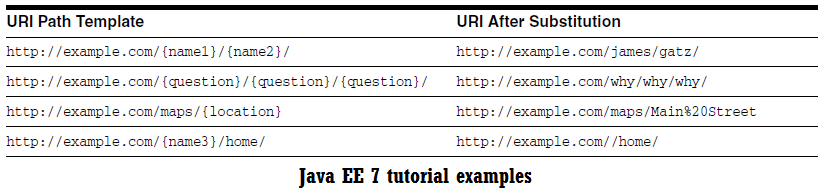
In the below figure (copy-paste from Java EE 7 tutorial) you can see more examples:
joi, 1 octombrie 2015
JAX-RS HelloWorld example
In this post, you can see a very simple JAX-RS application (the
HelloWorld example).
This application consist in a Java
web application that contain a RESTful root resource class and a class for
configuring our application - defines the base URI from which our application's
resources respond to requests.
The below POJO class uses the
JAX-RS annotations to become a RESTful root resource class:
import javax.ws.rs.Produces;
import javax.ws.rs.GET;
import javax.ws.rs.Path;

@Path("helloworld")
public class HelloWorldResource {

 @GET
 @Produces("text/plain") // default: */*
 public String helloWorld() {
  return "Hello, World!";
 }
}
We can put this in words as
follows: This ia a RESTful root resource class hosted at the relative URI, helloworld
(you can use /helloworld
also, it makes no difference), indicated via @Path annotation. It will respond to
requests of type HTTP GET (@GET) and it can produce (return) plain text as the MIME type (text/plain) indicates
via the @Produces
annotation.
So, the helloworld
is the relative URI. Further we need to define the base URI which can be
accomplished easily by using the @ApplicationPath annotation in a subclass of javax.ws.rs.core.Application
packaged within the WAR:
import javax.ws.rs.ApplicationPath;
import javax.ws.rs.core.Application;

@ApplicationPath("webresources")
public class ApplicationConfig extends Application {
}
Done! The application is ready and
we can test it by accessing the correct URL in the browser address bar:
http://localhost:8080/JaxrsHelloWorld_EE7/webresources/helloworld
It will simply display: Hello, World!
The complete application is
available here.
Abonați-vă la:
Postări (Atom)